
What is local SEO? Local SEO is the work of optimizing your Google Business Profile, your website and your online reputation so your business shows up when nearby customers search for what you offer: in Google’s “map pack,” in Google Maps, and more and more often in AI answers from ChatGPT, Gemini and Google AI Overviews.
If you run a clinic in North York, a salon in Newmarket or a renovation company in Mississauga, you don’t need to rank nationally. You need to show up when someone nearby types “hair treatment near me” or asks their phone for “a Persian-speaking accountant in Toronto.” The map pack usually shows just three businesses, and those three get a large share of the calls, direction requests and website clicks.
In this guide, I’ll walk you through 9 practical local SEO steps, without jargon, that small businesses in Canada can start on this week. If you’ve already read our guide on GEO and getting found in AI search, think of local SEO as the foundation that makes GEO work.
In this article:
How Google decides who shows up locally
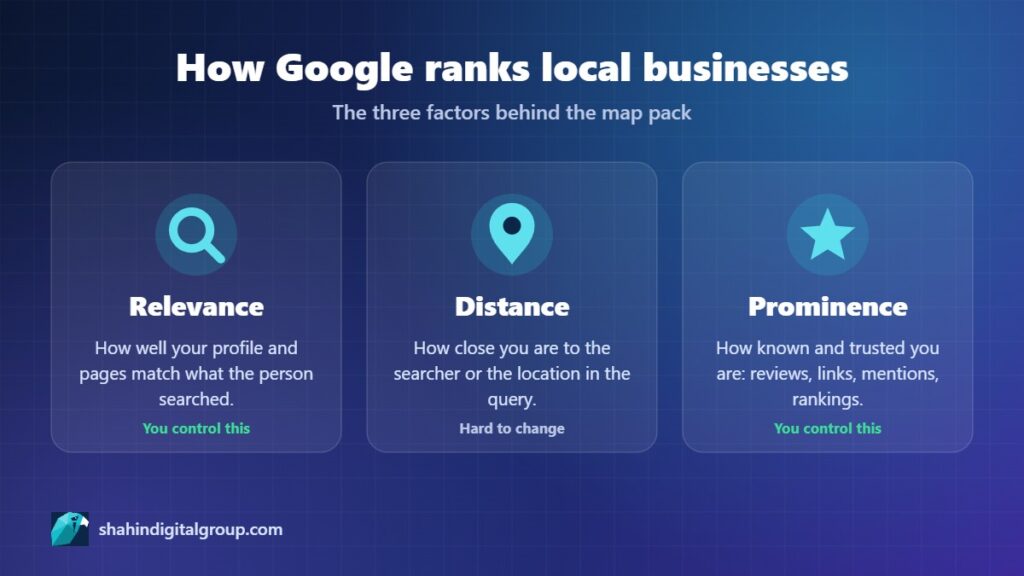
According to Google’s own documentation, local results are based mainly on three factors:
- Relevance: how well your Business Profile and website match what the person searched for.
- Distance: how far your business is from the searcher, or from the location named in the search.
- Prominence: how well known and trusted your business is, based on reviews, links, articles, directory listings and your regular search rankings.
You can’t move your office closer to every customer, but you control relevance and prominence almost completely. Every step below improves one or both of them.
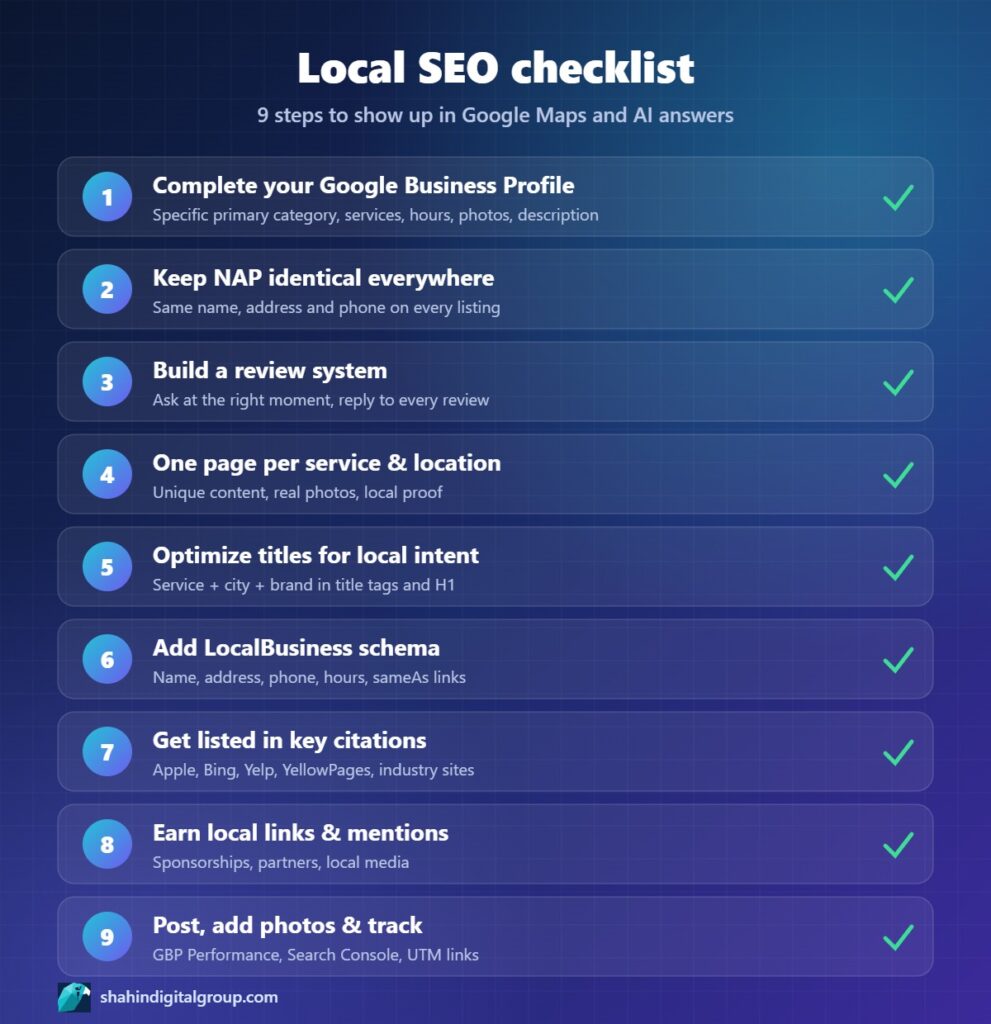
9 local SEO steps that actually move the needle
1. Claim and fully complete your Google Business Profile
Your Google Business Profile (GBP) is the single most important local SEO asset you have. Claim and verify it, then fill in every field that applies to you:
- Primary category: the most important choice on the profile. Pick the most specific option (“Hair Loss Treatment Center” beats “Beauty Salon” if that’s what you really do), then add a few accurate secondary categories.
- Services and products with short, plain-language descriptions.
- Hours, including holiday hours, so Google never shows you as open when you’re closed.
- Service area if you travel to customers instead of having them visit you.
- Business description that explains what you do, who you help and where, written for people, not stuffed with keywords.
- Real photos of your location, team and work. Stock photos don’t build trust.
2. Keep your NAP identical everywhere
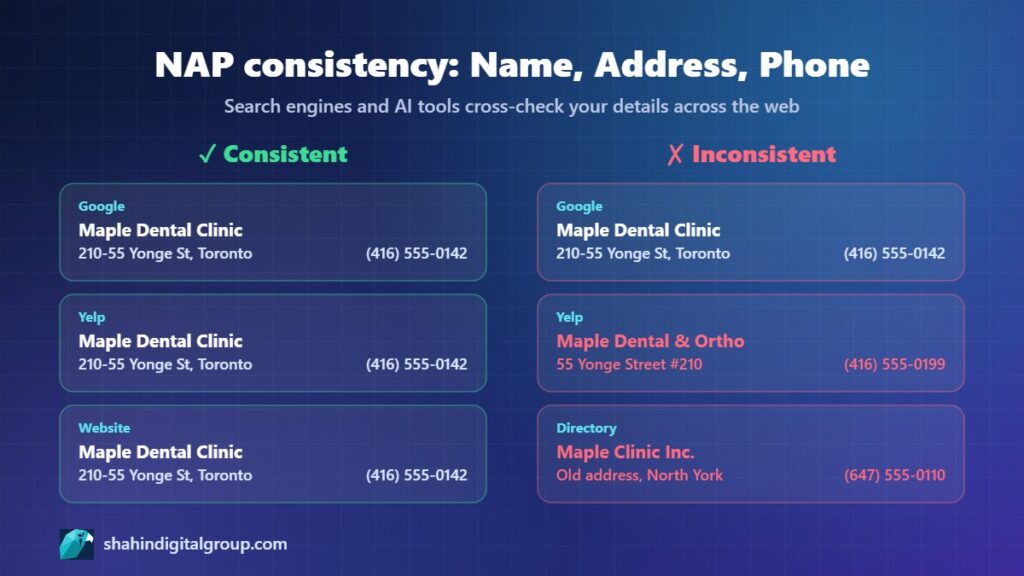
NAP stands for Name, Address and Phone number. Google, Apple Maps, Bing and AI assistants compare your details across your website, your profile and directories. When “Suite 210” appears in one place, “#210” in another and an old phone number in a third, you look less reliable, and your listings may compete with each other instead of supporting each other.
Pick one exact format, put it on your website (footer and contact page), and update every listing to match. If you move or change numbers, update everything the same week.
3. Build a review system, not a review wish
Reviews affect both prominence and conversions. Google looks at how many reviews you have, how recent they are, your rating, and even the words customers use. Instead of hoping for reviews, make asking part of your process:
- Ask at the moment the customer is happiest: right after a great result, not two weeks later.
- Send a short review link by text or email, and put a QR code at the counter or on the invoice.
- Reply to every review, positive or negative, ideally within 48 hours. Thank people by name and mention the service they used.
- Never buy reviews, offer rewards for them, or only ask happy customers. It’s against Google’s policies and can get reviews removed or the profile restricted.
4. Create one strong page per service and per location
A single “Services” page that lists twelve things rarely ranks well for any of them. Give each important service its own page, and if you serve several cities, create location pages that are genuinely different, for example a page for hair loss treatment in Newmarket and another for Aurora with local details, directions and reviews from customers in that area.
Each page should explain who the service is for, what the process looks like, an honest price range if you can share one, real photos, answers to common questions and a clear call to action. Avoid “doorway pages”: copying the same text and only swapping the city name. Google treats those as spam.
5. Optimize titles and on-page basics for local intent
- Title tag: service + city + brand, around 60 characters. For example: “Teeth Whitening in North York | Maple Dental Clinic.”
- H1 heading that matches the page’s main topic.
- Mention the city and nearby neighbourhoods naturally in the text, where they make sense.
- Add a click-to-call phone number and an embedded Google Map on your contact page.
- Make sure the site loads fast on mobile. Most local searches happen on phones.
6. Add LocalBusiness schema markup
Structured data tells search engines, in a machine-readable format, exactly who you are: business name, address, phone, opening hours, location coordinates and links to your social profiles (sameAs). It helps Google, and the AI systems that read your site, connect your website to your Business Profile.
On WordPress, plugins like Rank Math can generate LocalBusiness schema without code. After adding it, check your page with Google’s Rich Results Test.
7. Get listed in the right local citations
Citations are mentions of your business’s NAP on other websites. Focus on quality and accuracy, not on hundreds of random directories. For most Canadian small businesses, start with:
- Apple Business Connect (Apple Maps and Siri)
- Bing Places for Business
- Yelp and YellowPages.ca
- Your industry’s main directories and associations
- Your local Chamber of Commerce and community directories, including directories for the communities you serve (for example Persian business directories in the Greater Toronto Area)
8. Earn local links and mentions
Links and mentions from other local websites are strong prominence signals. One link from a local news site or a respected community organization is worth more than a hundred links from low-quality directories. Good opportunities include sponsoring a local event or sports team, partnering with complementary businesses, being interviewed by local media, and writing helpful guest articles for community websites.
9. Post, add photos and track your results
Use Google Business Profile posts for offers, events and updates, and keep adding fresh photos. Then measure what matters:
- GBP Performance: calls, direction requests, website clicks and the searches people used to find you.
- Google Search Console: which local queries bring visitors to your site.
- UTM tags on the website link in your profile, so Google Analytics shows how much traffic and how many leads come from Maps.
Local SEO and AI search: why this matters even more now
When someone asks ChatGPT or Gemini for “the best Persian-speaking dentist in Richmond Hill,” the AI builds its answer from search results, map data, reviews and directories. The signals it relies on are the same ones you build with local SEO: consistent business details, strong recent reviews, clear service pages and mentions on trusted local websites.
In other words, local SEO isn’t only about the map pack anymore. It’s how you become the business AI tools are confident enough to recommend. For the AI-specific steps, read our complete guide to GEO.
Common local SEO mistakes
- Stuffing keywords into the business name on your profile (for example “Maple Dental Best Dentist Toronto”). It breaks Google’s guidelines and can get the profile suspended.
- Using a virtual office or PO box as your address.
- Putting every service on one page.
- Ignoring reviews, especially negative ones.
- Changing your phone number or address without updating your listings.
- Running a slow, hard-to-use mobile website.
- Not tracking anything, so you never know what’s working.
How long does local SEO take?
It depends on your starting point and your competition. Fixing your Business Profile and NAP can show results in a few weeks. Building reviews, service pages and local links usually takes two to three months to make a noticeable difference, and competitive categories in big cities like Toronto can take six months or more. The good news is that local SEO compounds: every review, page and link keeps working for you.
The bottom line
Local SEO is one of the highest-return marketing investments a small business can make. Complete your Google Business Profile, keep your details consistent, make reviews part of your routine, give each service its own page, and earn mentions in your community. Do that consistently, and you’ll show up more often in Google Maps, in regular search results and in the AI answers your future customers are already reading.
Frequently asked questions
What is local SEO?
Local SEO is the process of optimizing your Google Business Profile, website and online reputation so your business appears when nearby customers search for your products or services, in Google Maps, the local map pack and AI answers.
Is local SEO different from regular SEO?
Yes. Regular SEO focuses on ranking pages in organic results anywhere, while local SEO focuses on location-based searches. It adds signals like your Google Business Profile, reviews, NAP consistency and local citations.
Do I need a website for local SEO?
You can appear in Google Maps with only a Business Profile, but a website makes a big difference. Service and location pages, schema markup and local content improve relevance and help you rank for more searches.
How many Google reviews do I need?
There is no magic number. What matters is having more recent, detailed reviews than the businesses you compete with in your area, and replying to them consistently.
Can I do local SEO myself?
Yes. Most of the steps in this guide, like completing your profile, fixing NAP details and asking for reviews, can be done without technical skills. An expert helps most with service pages, schema, local links and tracking.
About the author: Zar Shahin is a Toronto-based digital marketing specialist focused on SEO and AI search (GEO/AEO), Google and Meta ads, and marketing automation with n8n and AI agents. Founder of Shahin Digital Group.
Want to know why competitors show up in Google Maps and you don’t? Book a free consultation and we’ll review your local SEO together. We work in Persian, English and French.